 Zbot Smart GEO/SEO
Open any web page and see its SEO and GEO readiness in one click
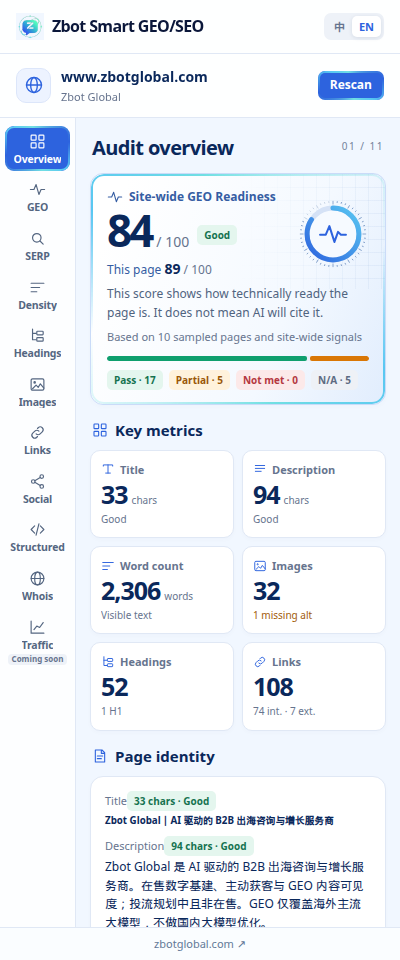
Zbot Smart GEO/SEO is a Chrome side panel extension. It reads the page you are viewing and lists its title, description, heading structure, images, links and structured data, with a 0–100 GEO (AI search) readiness score. No account, no cost.
Chrome Web Store link coming soonThe extension is listed as Unlisted. Zbot sends you the install link.
Get started in three steps
- Install
Open the Chrome Web Store link from Zbot and click Add to Chrome. - Open any web page
Your own website, for example, or a competitor's. - Click the Zbot icon in the toolbar
The side panel opens on the right with the results. It updates when you switch pages.
Features
The site-wide GEO score and this page's score, plus a summary: URL, title, description, canonical, robots, language, H1 and word count.
Site-wide GEO Readiness: 8–10 pages sampled from the sitemap are scored and combined, and each sampled page can be expanded for detail. Below it, this page's six dimension scores, the result of every check and suggestions, ready to copy as a report.
A Google result preview and the indexed-page estimates reported by Google, Bing and other search engines. On Google result pages it also shows the result count Google itself provides.
The most frequent words and 2–5 word phrases on the page.
H1–H6 counts and outline, flagging a missing H1, several H1s, skipped levels and empty headings.
An image inventory with alt text checks.
Internal, external and nofollow counts with a full list.
Open Graph and Twitter Card tags with share card previews.
schema.org types and content, with blocks that have an invalid format marked.
Registrar, registration and expiry dates, status and name servers, looked up via RDAP.
A third-party traffic estimate: visits last month, a 3-month trend, bounce rate, sources and rank. When a small site has no reliable estimate, connect Search Console for real data. An estimate can differ from real data by 50% or more.
How the GEO score works
GEO Readiness answers one question: is this page technically easy for AI to fetch, understand and cite? The score is calculated on the spot in your browser from published rules. No AI service is called. The same rules apply to every site.
| Dimension | Weight | What it checks |
|---|---|---|
| AI crawler access | 20% | Whether robots.txt allows OAI-SearchBot, Claude-SearchBot, Claude-User, PerplexityBot, GPTBot, ClaudeBot, Google-Extended, Googlebot and Bingbot; whether the page blocks indexing or snippets; whether the site has an llms.txt. |
| Machine readability | 15% | How much of the main content is readable without JavaScript; a clear heading structure; a declared page language. |
| Structured data | 20% | Whether JSON-LD parses; organization details, a content type (FAQPage, Product, Article and so on) and breadcrumbs; author and date on articles. |
| Content citability | 25% | Question-style headings, lists and tables, specific figures, and links to external sources. |
| Trust and E-E-A-T | 10% | Author byline, About page, contact details, and a publish or update date. |
| Brand consistency | 10% | Whether og:site_name and the structured data brand name exist and match, and whether the title includes the brand. |
80–100 is Good, 50–79 is Fair and 0–49 is Needs work. Five checks count on article pages only: author and date in schema, author byline, publish or update date, specific figures and cited sources. On homepages, product pages and other landing pages they show N/A. Specific figures leave out byline dates, standard numbers such as ISO 9001 and digits in model numbers, and include common electronics units such as 10 kΩ and 4-layer. Checks that cannot be run are left out of the score. These are the v1 rules and will be tuned based on tests with real pages.
Site-wide score and this page's score
The large score at the top of the GEO tab is the site-wide GEO Readiness. The small card below it is the score of the page you are viewing. The site-wide score works like this:
- Site-wide signals are checked once: whether robots.txt allows AI crawlers, whether there is an llms.txt and a sitemap, Organization / WebSite structured data on the homepage, and whether the homepage and sampled pages use HTTPS.
- 8–10 pages are sampled from the sitemap: this page, the homepage, up to 2 product or service pages, the About and FAQ pages when they exist, and blog posts. When the site has a blog, the 3 newest posts by their own publish date are used (5 candidates are picked by sitemap date first), not random old posts. Without a sitemap, pages are sampled from this page's internal links.
- Each sampled page is scored with the single-page rules. Page-level checks such as specific figures and cited sources score by the share of applicable sampled pages that meet them: if 2 of 3 posts give specific figures, that check earns 2/3 of its points.
- Each dimension's rate is weighted and added up to give the site-wide score. Checks that are N/A or could not be run are left out.
Sampled pages are read as raw HTML without running JavaScript, so "content rendered on the server" is checked on the current page only. The site-wide score changes slightly with the page you have open, because that page is part of the sample and some checks look at the current page only. For example, venture-ems.com scores 85 site-wide on the homepage and 83 on an AQL article. This page's result comes first; the site-wide result usually fills in within 10 seconds. The same site is not sampled again within 10 minutes unless you click Rescan. The site-wide score is based on a sample and does not mean every page on the site has that score. If the sitemap cannot be read, or the browser is offline, the site-wide score is still shown. When only the current page can be counted, it is labeled "Based on 1 sampled page and site-wide signals".
What the score means and what it doesn't
The score shows how technically ready the page is. It does not mean AI will cite the site. Three more things to know:
- robots.txt allowing a crawler does not mean the crawler actually gets through. A site's CDN or firewall may block it, and the extension cannot see that layer.
- Google says pages need no special AI files or structured data to appear in AI Overviews and AI Mode; they only need to be indexed and allowed to show snippets. The llms.txt and schema checks reflect general machine-readability practice, not Google requirements.
- The specific figures and cited sources checks are based on a published study showing that citations, quotations and statistics raise visibility in generative engine answers. That is a research finding, not an official rule of any AI product.
Permissions and data
Why Chrome says it can "read and change all your data on all websites"
While the side panel is open and you switch to another page, the results switch with you, so the extension needs to read any page you open. It also requests the site's own robots.txt, sitemap and a few sampled pages, and asks search engines and RDAP servers for index counts and domain registration details. Apart from this, it asks for the side panel (sidePanel), page reading (scripting), local storage (storage) and identity. identity is used only when you click Connect Search Console, to open Google's authorization page. If you never connect, it is not used. The exact wording of the prompt is whatever Chrome shows.
When the extension reads a page
Only while the side panel is open: the current page, plus the raw HTML of a few pages sampled from the site's sitemap for the site-wide GEO score. With the side panel closed it does not read other pages. Google result pages are the exception. Whether or not the side panel is open, the extension reads the result count Google puts on the page (such as "About 33 results") and shows it above the results. That step sends no request. By default it also shows a monthly-visit estimate under each result and sends those domains to a Zbot server. You can turn that off on the Traffic page; once off, result pages send no visit requests.
What it reads and what it doesn't
It reads the page's public content: title, meta tags, headings, images, links, structured data and visible text. It does not read what you type into forms, cookies, browser storage or browsing history. It does not change pages, with three exceptions: clicking a row on the Headings tab scrolls the page to that heading and outlines it briefly; a result-count line is added above Google results; and a monthly-visit line is added under each result (you can turn that off).
Where the data goes
The analysis runs in your browser and page content is not uploaded to Zbot. Every request the extension sends is listed in the privacy policy below.
FAQ
Does it cost anything?
No. The extension is free, with no paid features and no usage limits.
Do I need an account?
No Zbot account. Install it, open a page and click the icon. You can optionally connect your own Search Console to see real visit data. The extension works without that connection.
Which browsers are supported?
Desktop Chrome 116 or later on Windows and macOS. Other browsers such as Edge are not promised yet, and Chrome on mobile is not supported.
Is my data uploaded?
Page content is not. A traffic estimate sends the domain to a Zbot server, which asks a third-party data provider. The optional Search Console connection opens accounts.google.com for authorization and sends read-only queries to www.googleapis.com. Details are in the privacy policy.
Why is the score different from other tools?
Every tool uses its own rules, so scores are not expected to match. Our rules are published in the How the GEO score works section and apply equally to every site.
Privacy policy
Effective date: 2026-11-25 (draft; the final text will be published after legal review)
1. Who publishes the extension
Zbot Smart GEO/SEO is published by Zbot Global (zbotglobal.com). Legal entity name: [to be confirmed]. Contact: customer@zbotglobal.com.
2. What information the extension handles
- The public content of the page you are viewing: title, meta tags, headings, image addresses, links, structured data and visible text.
- The domain and address of that page.
- On Google result pages, the result count text Google shows (such as "About 33 results"), and the domains in result links when monthly visits are shown. You can turn that off on the Traffic page.
The extension does not collect personal information such as names, emails or phone numbers, and does not read form input, cookies, browser storage or browsing history.
3. Where it is processed
Page content is processed in your browser and is not uploaded. The extension reads the current page only while the side panel is open. The exception is Google result pages: it reads the result count and can show a monthly-visit estimate under each result (you can turn that off on the Traffic page). The result count sends no request; the visit estimate sends the domains in the results to a Zbot server.
4. Who the extension sends requests to
| Recipient | When | What is sent |
|---|---|---|
| The site you are viewing | When the side panel analyzes the page | Requests for the site's robots.txt, llms.txt, sitemap and the current page's raw HTML. If robots.txt declares no sitemap, a request to /sitemap.xml; if the sitemap is an index, up to 6 child sitemaps. Then the raw HTML of 8–10 pages sampled from the sitemap, for the site-wide GEO score; without a sitemap, pages are sampled from the current page's internal links. If a sampled page redirects, the browser follows the redirect like a normal visit, but pages that land on another site are not scored. |
| Image addresses declared by the page | When showing image thumbnails and share previews | Ordinary image requests. |
| Search engines: Google, Bing, Yahoo, Baidu, Ask, AOL (results page served by Yahoo), Sogou, Brave | When you open the SERP tab | A "site:domain" query to read the indexed-page estimate. A domain is not queried again within 24 hours unless you click Rescan. Like your own searches in the browser, these queries carry your cookies for that search engine; if you are signed in and search history is on, they may appear in your search history. Yandex, DuckDuckGo, Naver and Qwant only get a link that opens in a new tab when you click it. |
| The RDAP server for the domain's extension (for .com, rdap.verisign.com) | When you open the Whois tab | The domain name. |
| Zbot servers and a third-party data provider | When you open Traffic, or when visit estimates are shown on Google results (on by default; turn off on the Traffic page) | The domains you look up. The server asks a third-party provider for a traffic estimate and caches it for 30 days. Page content is not sent. An estimate can differ from real data by 50% or more. For rate limiting, the server keeps a short-lived count by source IP and deletes it when it expires. |
| accounts.google.com | When you click Connect Search Console | The browser opens Google's authorization page. This is optional and does not happen unless you connect. |
| www.googleapis.com | When you open Traffic after connecting Search Console | Your verified site list, and clicks, impressions, CTR and average position for the last 28 days. Read only. |
The robots.txt, llms.txt, sitemap.xml, raw HTML of the current and sampled pages, and RDAP lookups are sent without cookies or login state. Search engine queries are described in the table above.
5. What is stored on your device and how to clear it
- Your interface language.
- A per-domain cache of lookups: index estimates (24 hours), Whois results (24 hours), robots.txt and llms.txt content (10 minutes), and whether sitemap.xml exists (10 minutes). The cache records the domains involved and deletes them when they expire.
- When a search engine asks for a captcha, the time until which the extension pauses queries to it (30 minutes).
- pref:trafficSerp in chrome.storage.local: whether Google results show monthly visits. On by default. Turning it off stores false.
- gscSession in chrome.storage.session: the Search Console access token and its expiry. Present only after you connect. Cleared when the browser closes, and when you click Disconnect.
Page content and visit history are not stored; raw HTML is only held in memory for the calculation. Site-wide GEO results (the sampled pages and their scores) are kept in memory only, expire after 10 minutes and are cleared when the side panel closes. Uninstalling the extension removes all of the above.
The extension asks for sidePanel, scripting, storage, identity, and permission to read all sites. identity is only for the optional Search Console connection.
6. What we don't do
- We don't collect personal information, and don't read forms, cookies or browsing history.
- We don't sell data, use it for advertising, or let people read user data.
- The extension contains no third-party analytics or ad code and loads no remote code.
7. Third parties
Search engines, RDAP servers and the site you are viewing see your IP address as with any ordinary visit. Their own privacy policies apply to how they handle it.
8. Zbot servers
Traffic estimates connect to a Zbot server. Only the domain you look up is sent. Page content is not sent, and there is no anonymous install ID. For rate limiting, the server keeps a short-lived count by source IP: requests per minute, and new domains per day. Those counts are deleted when they expire. They are not tied to an account and are not used to identify you. Estimate results stay in the server cache for 30 days so later lookups can reuse them.
9. Limited Use
The use of information received from Chrome APIs by Zbot Smart GEO/SEO will adhere to the Chrome Web Store User Data Policy, including the Limited Use requirements. Data is used only for the extension's single purpose: analyzing the current page's SEO and GEO readiness, and showing a third-party traffic estimate. It is not transferred to third parties except where that purpose requires it. Those cases are: sending the domain to search engines and RDAP servers; sending the looked-up domain to a Zbot server and a third-party data provider for a traffic estimate; and, only if you choose to connect Search Console, sending the authorization to accounts.google.com and read-only queries to www.googleapis.com. It is not used for personalized advertising, is not sold to data brokers or anyone else, and is not read by people.
10. Changes to this policy
When the extension's behavior changes, we update this policy and the effective date at the top.
11. Contact
Questions about this policy: customer@zbotglobal.com.